For information on replies to text senders, please read the corresponding article.
General information
When sending SMS to most networks worldwide, you can set your own sender identifier which will be displayed to your recipients as the sender. This name may consist of up to 11 alphanumeric characters or be a phone number. Please note that there are some international restrictions regarding the sender ID - e.g. SMS to the USA are always sent from our US phone number.
Theoretically, an alphanumeric sender can also contain special characters like . , : _ - or spaces. However, we recommend using only letters in the sender, as correct sending with other characters cannot be guaranteed.
Phone numbers as senders can be transferred in any format. These are automatically recognized and formatted internally.
Please note: Only SMS that use a phone number as sender can be answered.
In some countries, an alphanumeric sender ID has to be registered before you send. For Austria you handle this yourself under Settings -> Compliance, see Pre-register a sender ID.
Set a default sender
A default sender is automatically used whenever you don't specify another sender ID, and it is pre-selected in the Send Message dialog when you compose a new SMS. Open Settings -> Messages and enter the value under Default Sender, then click Save Changes.
Create sender IDs
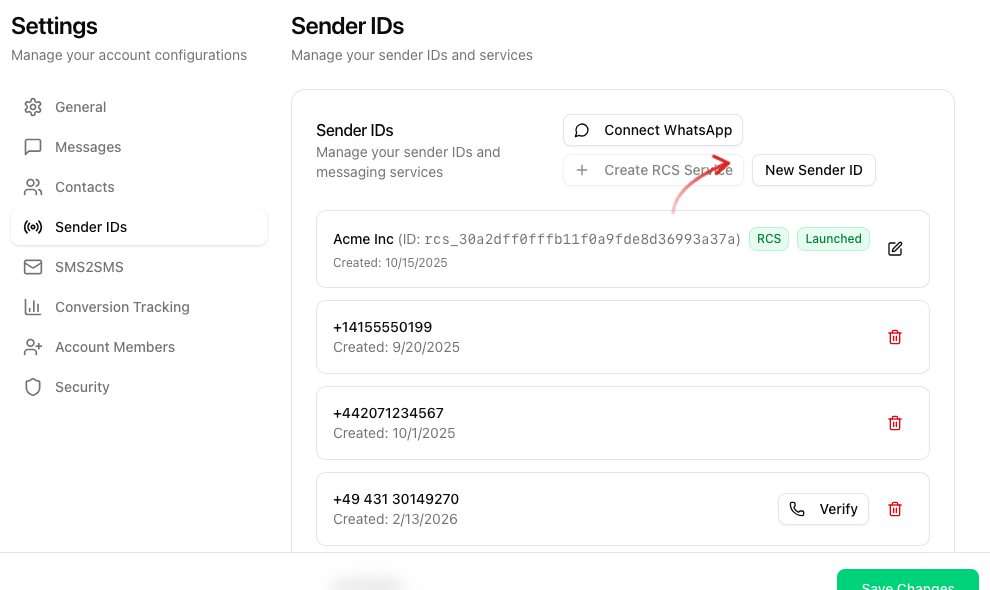
Manage your sender IDs under Settings -> Sender IDs. Click New Sender ID to add an alphanumeric sender or a phone number, Connect WhatsApp to attach a WhatsApp Business account or Create RCS Service to register an RCS agent.
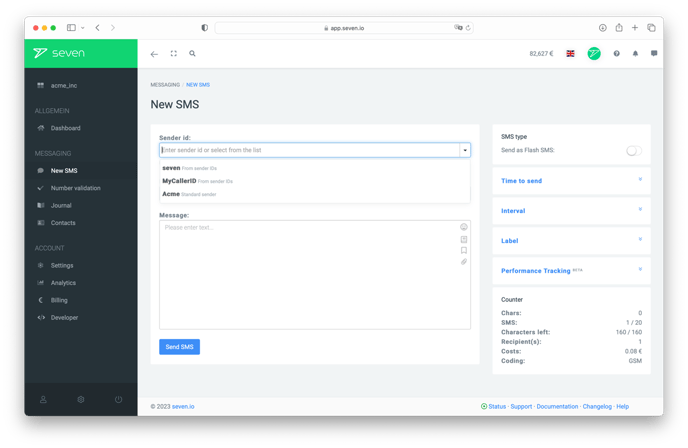
When sending an SMS you can select any of these sender IDs from the Sender field of the Send Message dialog, or just type a new one directly.
Use your own phone number as sender
You can enter a phone number you already have - for example your landline or mobile number - as a sender ID. You do not need to order a number from us for this: an ordered number is only required if you want to receive SMS or calls (see Ordering your own number). The identity check described there applies solely to buying a number for inbound traffic, not to using your own number as sender.
Add the number under Settings -> Sender IDs and then confirm it by phone.
A phone number used as sender must always be verified. As long as the verification is not completed, your phone number may be replaced automatically with the neutral sender ID InfoSMS when sending. The verification unlocks the number both for SMS sending and for outbound calls.
Verify phone number
Verification is done by phone. This process ensures that the number belongs to you and prevents misuse.
Verification Process
Add phone number
In your customer account, go to Settings -> Sender IDs and add the phone number you want to use.Start call
Click Verify next to the number. The dialog displays a six-digit code. Click Start Verification and you will receive a call at this number from +49 431 30149000.Enter verification code
During the call, enter the code shown in the dialog using your phone’s keypad to confirm your number. For details, see Verify sender number.Complete verification
After entering the code successfully, the number will automatically be marked as verified and can then be used as a sender ID.
Valid and Invalid Senders
Valid sender IDs
004915123456789 - will be recognized as phone number
+4915123456789 - is recognized as phone number
0151 - 23456789 - is recognized as a phone number
CompanyABC
Alarm
Fire dept
Invalid sender IDs
ZahnarztpraxisMustermann - Sender is too long (max. 11 characters)
Sender$123 - Invalid special characters in the sender
Our system automatically replaces invalid or missing sender IDs. If you do not specify a sender, the setting for the default sender from your account will be used, if available.
Flash SMS and Senders
Newer devices may replace your default sender with neutral names like "SMS". For more information, please see the article on Flash SMS.
Sender via API
When sending SMS via the API, specify the sender name using the from parameter. For more information, see our HTTP API documentation.