Are you looking for information about receiving SMS without your own phone number? Please read our article "Receive replies and forward them".
When you need your own number
You order your own number when you want to receive SMS or calls on it. If you only want a phone number you already have to be displayed as the sender of your SMS, no order is required. Instead, add the number under Settings -> Sender IDs and verify it by phone - a phone number used as sender must always be verified. You will find the details in the article Set Sender ID.
Requirements
The identity check below only applies to ordering your own number for inbound traffic. It is not required to verify a phone number as a sender ID.
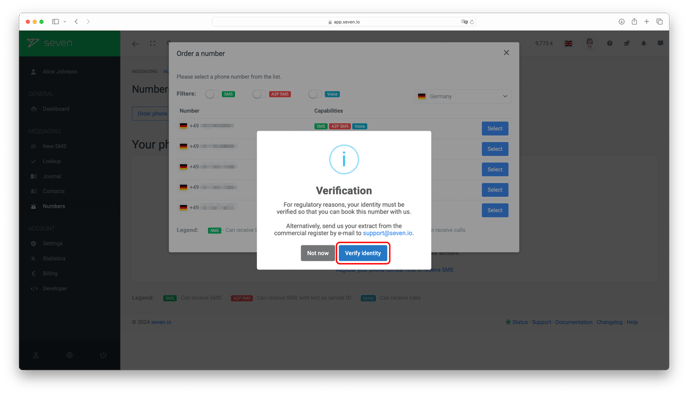
Please note: If you order your own number, you must verify your identity for regulatory reasons. You can do this quickly and easily yourself when you order the number.
If this is not possible, we can also authorise you manually. In this case, please send us a copy of your ID, extract from the commercial register, extract from your association registration or a comparable document to support@seven.io.
Once we have received your document, we will activate the ordering of your own telephone number for you. You can then order your own number conveniently in our webapp.
For pricing, please have a look at our pricing page.
Furthermore, you should pay attention to the country from which you want to receive SMS. For more information on this, please refer to the article "Inbound SMS do not arrive".
Get your own number
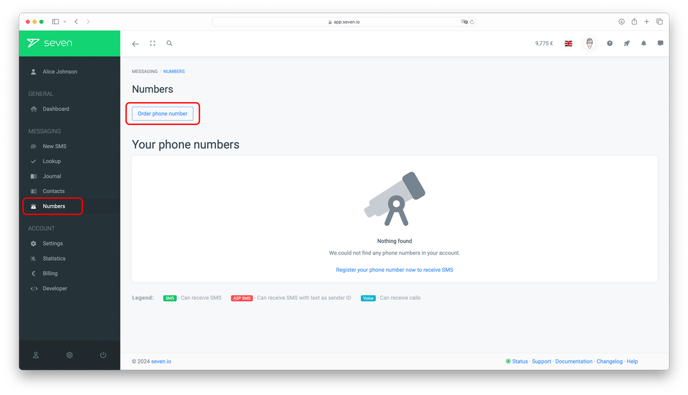
Log in, open Phone Numbers in the left menu and click Register phone number in the top right.
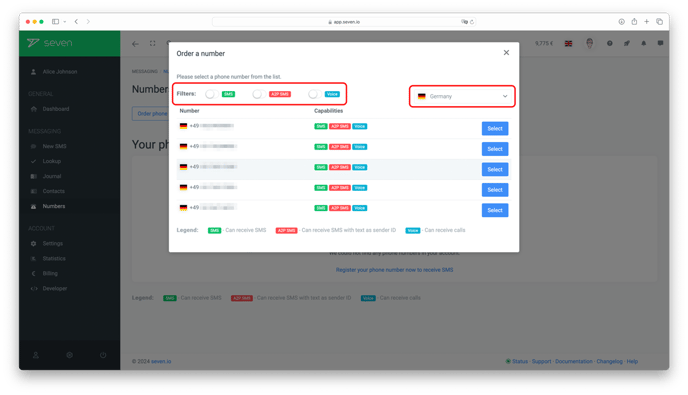
In the dialog, pick a country and the functions you need (SMS, A2P SMS, Voice). For Germany, mobile numbers are available as well. Click Select on the number you want.
In the confirmation step pick a Payment interval (Monthly or Yearly), review the costs and click Register. This click finalizes your order. The number is available in your account immediately after ordering and can be used right away.
Reactivating deleted inbound number
Please read the article Reactivate deleted inbound number.
Changing the payment interval
Please read the article Change the payment interval of your phone number.