Need an updated address on your invoice or ordered credit by mistake? You can create a new invoice yourself and, in certain cases, cancel an invoice as well.
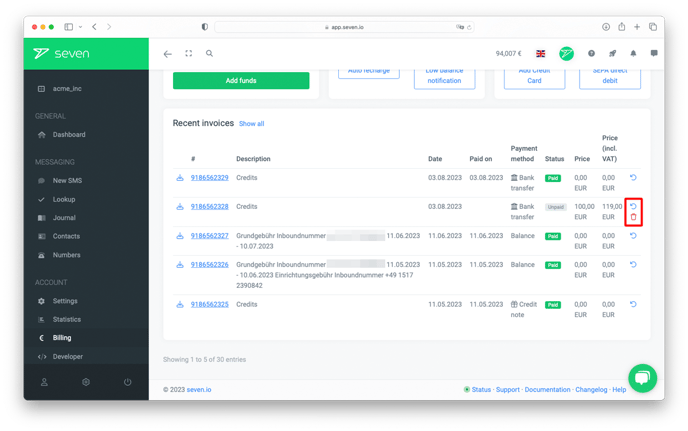
Both options live on the Statement page. Open the Billing page and click Show all under "Recent Invoices" - or navigate directly to /billing/statement.
Create a new invoice
Learn how to change your invoice data in the article Change billing address.
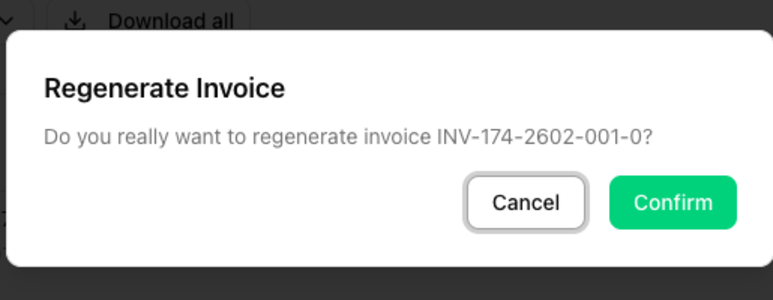
Once the change is saved, click the Regenerate PDF icon (circular arrow) next to the invoice and confirm with Confirm in the Regenerate Invoice dialog. This option is available for one year after the invoice was first issued.
Cancel an invoice
To cancel an invoice, click the red delete icon next to the invoice and confirm in the dialog. You can cancel invoices yourself if they are paid by bank transfer and have not been paid yet.
If you want to cancel an invoice that does not show the cancel icon, please contact our support team.
Unpaid bank-transfer invoices are cancelled automatically after 60 days.