Your API key is a combination of letters and digits that acts like an additional password. Your application uses it to identify itself with our API and to protect your account from unauthorized access. See the REST API documentation for usage details.
View API keys
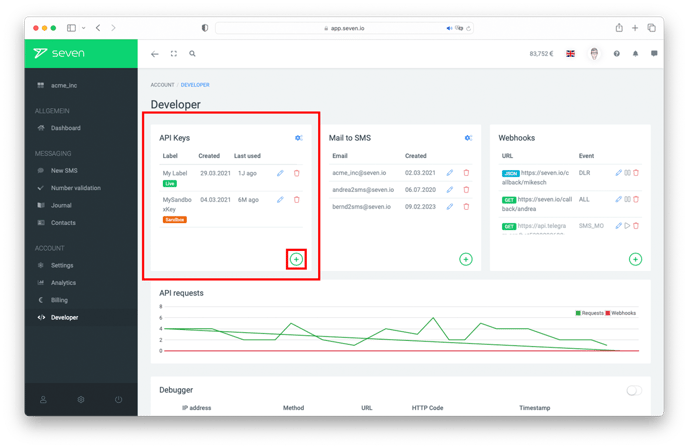
Open Developer -> API Access. The list shows all existing REST API keys, Mail API addresses and SMPP connections with their label, environment (Live/Sandbox), creation date and last use. Click the pencil icon to adjust label and permissions, or the trash icon to delete a key.
Important: For security reasons, the API key value is only shown once, right after creation. Copy it immediately to a safe location. If you've lost it, you have to delete the old key and create a new one.
Create a new API key
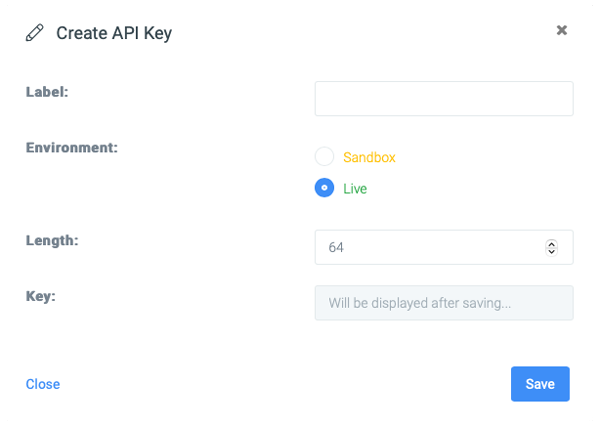
Click Create New at the top right and pick REST API. In the Create API Key dialog you configure:
- Label to tell your keys apart
- Environment: Live for real dispatch, Sandbox for testing without dispatch and without paid products
- Key Length: 64 characters recommended; only choose less if strictly necessary
- Permissions: scopes you can toggle individually (sms, contacts, balance, etc.)
- Valid Until: expiration date or unlimited
Click Save to create the key. The key value is then displayed once - copy it then.
Recommendation
For sensitive data transfers in particular, we recommend rotating API keys regularly: delete the old key, create a new one, switch your application over.