How to Set a Default Country Code
Click your account in the bottom left and open Settings -> General. In the General Settings section, enter the desired code under Default Country Code, e.g. 49 for Germany, and click Save Changes.
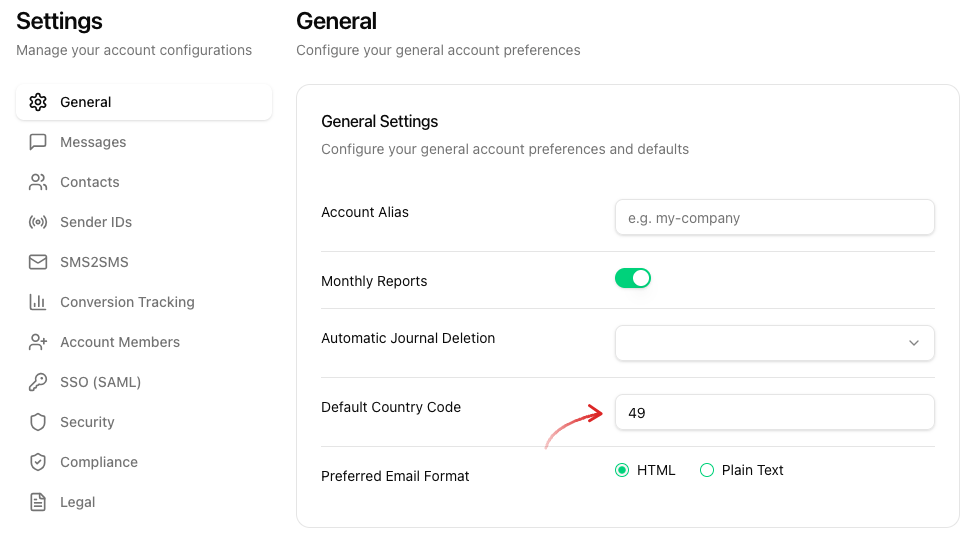
If you enter a phone number without a country code, the code specified here is used automatically.
Use this setting if you want to add your numbers in local format. If you are adding numbers from different countries, we recommend that you do not set a default country code, but instead make sure that the numbers are in the correct international format. If you do not want a default country code, leave the field empty.
Example
You create the number 0123 45678910 in your contacts, i.e. without a country code.
- If
49(Germany) is set as the default country code, the SMS is sent to +49 123 45678910. - If
1(USA) is set, the SMS is sent to +1 123 45678910. - If you created the number as +49 123 45678910, i.e. with a country code, the SMS is sent to this number regardless of the default country code.
An overview of all country codes can be found in the List of country calling codes (Wikipedia).
You can find more information about international SMS in our blog post about international communication.