Before your RCS service can deliver messages to real recipients, it goes through verification, configuration, and approval by Google as well as the selected network operators. This article walks you through every step.
Tipp
Test it yourself first: You can try out your RCS service on your own devices before it goes live. Invite test numbers in the Settings tab of your service. You can send RCS messages to these numbers and see exactly how they arrive on the recipient's phone. For instructions, see Getting Started with RCS: Test Service.
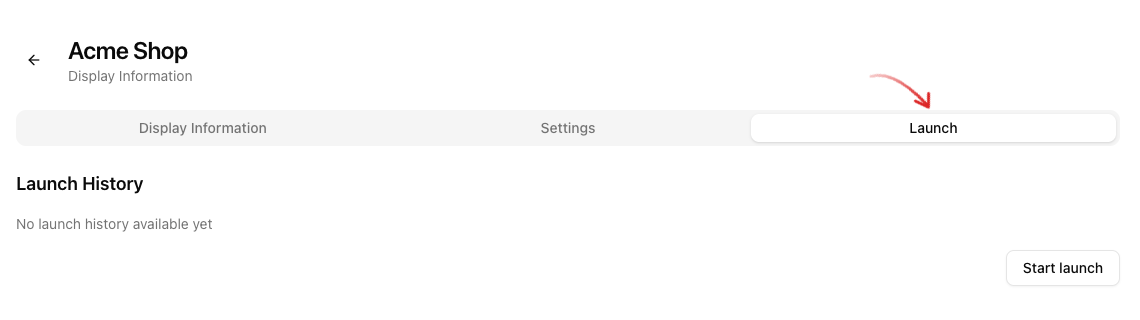
Open your RCS service and switch to the Launch tab at the top. Click Start launch to begin the launch request. Once a request has been submitted, the button changes to Add more operators. The button only becomes active once all required fields in the Display Information tab have been filled in. The dashboard lists any missing details directly below the button.
Auf einen Blick
- Verification of the company by Google (1-3 business days).
- Provide the Agent Experience (service behavior) and Agent Preview (instructions, video, screenshots).
- Select the operators.
- For German carriers (Telekom, Vodafone, O2, 1&1) and Austrian carriers, also fill in the brand approval form (DE or AT) and upload it directly when selecting the operators - the review takes several weeks.
- Request the launch - wait for carrier approval.
1. Verification
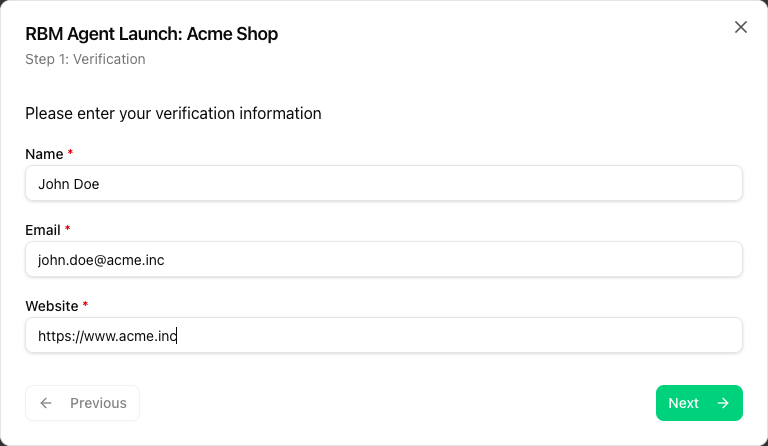
In the first step of the dialog, enter Name, Email and Website. Google checks whether the requesting company is actually the owner of the specified brand. You may receive a confirmation email at an address on your company domain. Free email addresses are rejected.
2. Define the service behavior
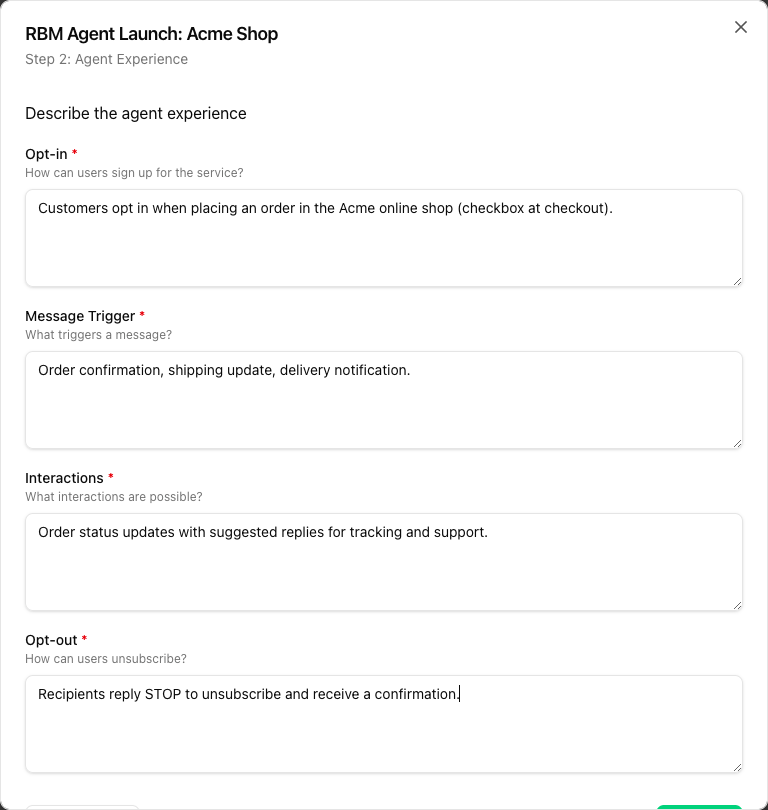
In the Agent Experience step, you define how your service interacts with users:
| Field | Content |
|---|---|
| Opt-in | How do users sign up for the service? (registration, checkbox during checkout, double opt-in) |
| Message Trigger | What triggers a message? (purchase, support request, appointment) |
| Interactions | What interactions are possible? (status updates, suggested replies, support) |
| Opt-out | How can users unsubscribe? (e.g. send STOP) |
These details are binding. If you later send messages that do not match the described behavior, you risk your service being blocked.
3. Preview for network operators
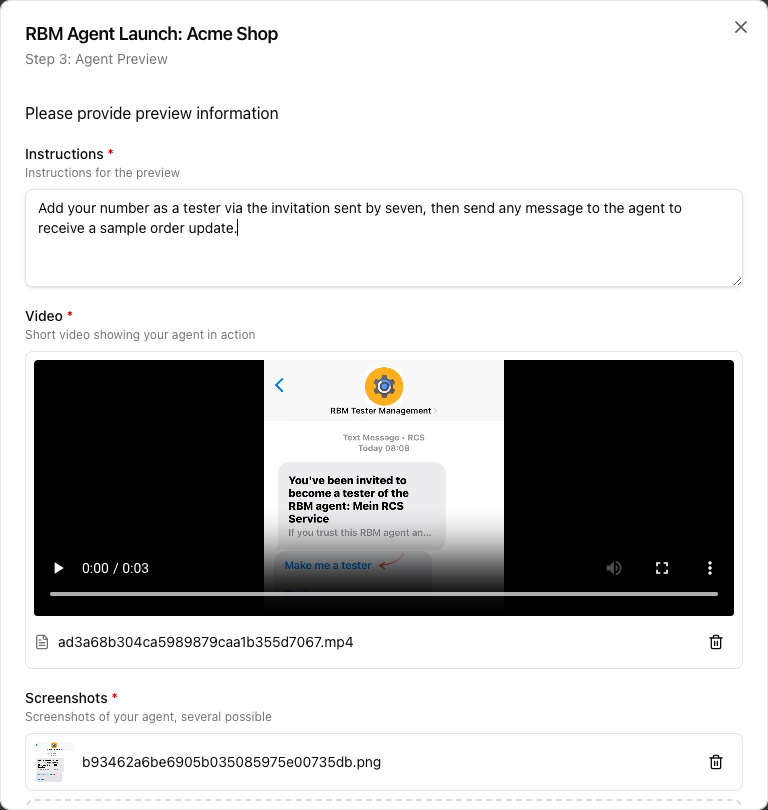
In the Agent Preview step, you show the carriers what recipients can expect:
- Instructions: Description of how the carriers' reviewers can test the service (e.g. adding a test number, sending a message to the agent). This information is intended for the reviewers - your own test numbers are independent of it.
- Video: short video (30-60 s) from the recipient's perspective, including the opt-out flow. MP4, MOV or WebM, max. 45 MB.
- Screenshots: e.g. welcome message, typical conversation, opt-out confirmation. PNG or JPEG, max. 10 MB per file, several possible.
A maximum of 10 files is allowed per service.
4. Select network operators
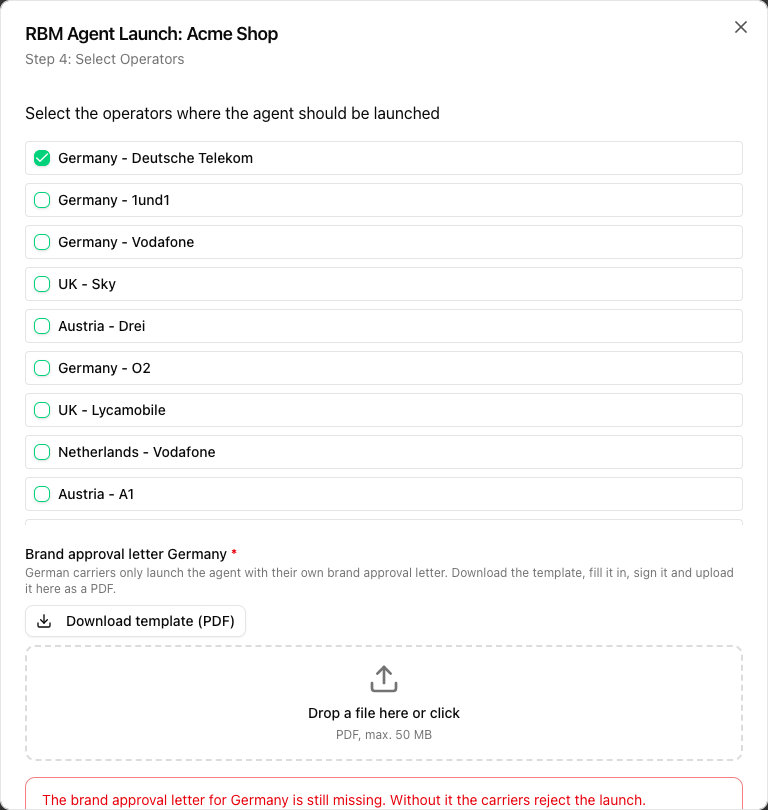
In the Select Operators step, tick the carriers through which the service should be deliverable. If a network operator you need is missing, contact seven support.
Hinweis
German and Austrian network operators: brand approval form required
To activate the service with the German carriers Deutsche Telekom, Vodafone, Telefónica/O2 and 1&1 as well as with the Austrian network operators, the carriers additionally require a completed brand approval form. Without this document, your RCS service will not go live in Germany or Austria.
- As soon as you tick a German or Austrian operator, the field Brand approval letter for that country appears in the same step, together with the Download template (PDF) button.
- Form for Germany: RBM DE Brand Approval (PDF)
- Form for Austria: RBM AT Brand Approval (PDF)
- Fill it in completely, sign it and upload it as a PDF (max. 50 MB, up to 5 documents per service).
- As long as no form has been uploaded for a selected country, Request Launch stays disabled.
- Once the launch request has been submitted, documents can no longer be added or removed.
- The review runs independently of the Google verification process and can take several weeks.
5. Request launch
Once all steps are complete, click Request Launch. The request is sent to the selected network operators for review. Incomplete requests are rejected and must be resubmitted from scratch.
6. Status and updates
You can see the current state at any time in the Launch tab under Launch History. You will also receive status changes by email.
| Status | Meaning |
|---|---|
| Pending | Request is with the carrier for review |
| Approved | Carrier has approved, sending is possible |
| Rejected | Carrier has rejected - usually without giving a reason; seven cannot appeal the decision |
| Live | Service is finally active at the carrier |
The statuses apply per network operator: each selected carrier reviews your service separately and grants or refuses approval individually. A service can already be approved by one carrier while it is still under review or rejected by another.
The overall status of the service (e.g. "launched") refers to the service as a whole and does not mean that every operator has approved it. A rejection notice from a single carrier is therefore not a contradiction: the service is live with the approved operators, while sending to recipients in the rejected network is not possible.
Operators usually reject without giving a reason. seven has no influence on this decision and cannot appeal it. If a carrier has rejected your service, contact seven support - we will check with you whether a new request makes sense.