With the Mail API you send SMS directly from your email client or from any application that can send emails. This requires a Mail API configuration. How to create one is described in the article Set up the Mail API.
Address
Each configuration has a fixed address, which you find in the dashboard under Developer -> API Access:
TOKEN@gateway.seven.io
PREFIX.TOKEN@gateway.seven.io
The token is generated by seven and stays fixed. You choose the prefix freely for each mail: everything before the last dot of the address is the prefix and is evaluated using the address prefix pattern.
If the address prefix pattern is {{to}}, a mail to 4917612345678.a1b2c3d4e5f6g7h8@gateway.seven.io goes to the phone number 4917612345678. Instead of a phone number, you can also specify a contact or a group from your address book.
If you have enabled the option Additionally allow the address without token in the configuration, the prefix alone is enough: 4917612345678@gateway.seven.io.
Recipient, text and sender
You define where in the mail the recipient, the message text and the sender are located using the patterns of the configuration:
- Recipient: via
{{to}}in the prefix, the subject or the body. If no pattern captures the recipient, the SMS goes to the fixed recipient from the configuration. - Text: with the default setting (body pattern
{{text}}), the entire mail text becomes the SMS. With literal text in the pattern you delimit the text, e.g.(({{text}})), so that signatures are not sent along. - Sender: via
{{from}}in a pattern or via the sender of the message from the configuration. If both are empty, the default sender of your account applies.
Further options such as the sending time ({{delay}}), a label ({{label}}) or a flash SMS ({{flash}}) are also controlled via variables in the patterns. Control parameters in the subject such as from= or key= are not evaluated for configurations with a fixed address. You can find the complete list of variables in the Mail API documentation.
An example: A monitoring tool sends its alert in the subject to a1b2c3d4e5f6g7h8@gateway.seven.io. In the configuration, the subject pattern is {{text}}, the body pattern is empty and your on-call number is entered as the fixed recipient. The subject CPU load critical on srv-07 then becomes an SMS with exactly this text to the on-call number.
Sender address
Always send from one of the allowed senders of the configuration. Mails from other addresses are not processed. If the DMARC check is active for the configuration, your mail must also pass it. You can see rejected mails with code 904 in the Debugger.
Classic format (legacy configurations)
Configurations created before the fixed address was introduced are marked Legacy in the dashboard and keep working unchanged. Here you control sending via the recipient line and the subject:
- Recipient: phone number before
@gateway.seven.io, e.g.01761234567890@gateway.seven.io. - Subject: commands in the format
parameter=value, separated by spaces, e.g.from=Flowershop key=123456789. Put values containing spaces in quotation marks:from="Flower House". Ato=in the subject overrides the recipient line, which lets you reach groups, for example. - Text: the mail text. If you enclose it in double hashes (
##This is your text##), only the part in between is sent.
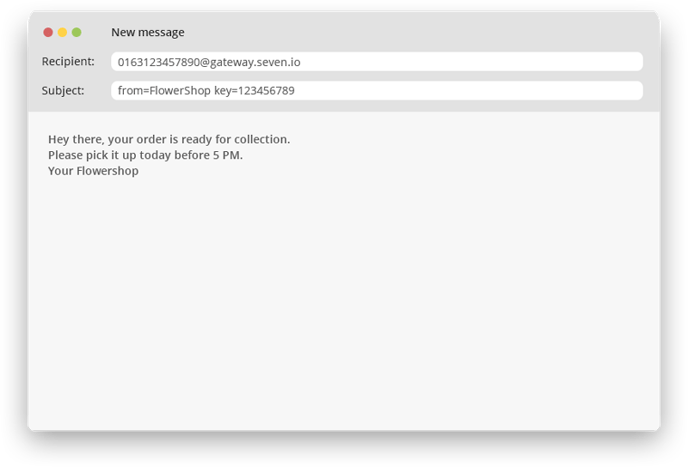
You can find all parameters of the classic format in the Mail API documentation.