The Mail API lets you send SMS or RCS messages from your email account via our gateway. For details on usage see Sending SMS via email and Sending RCS via email.
Create a Mail API address
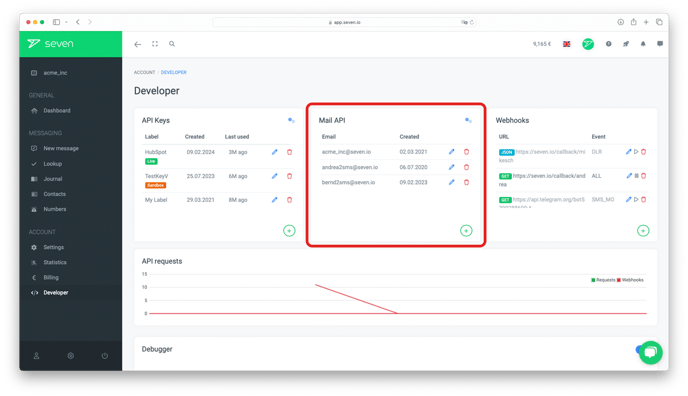
Open Developer -> API Access. The page lists all your REST API keys, Mail API addresses and SMPP connections side by side. Click Create New at the top right and pick Mail API.
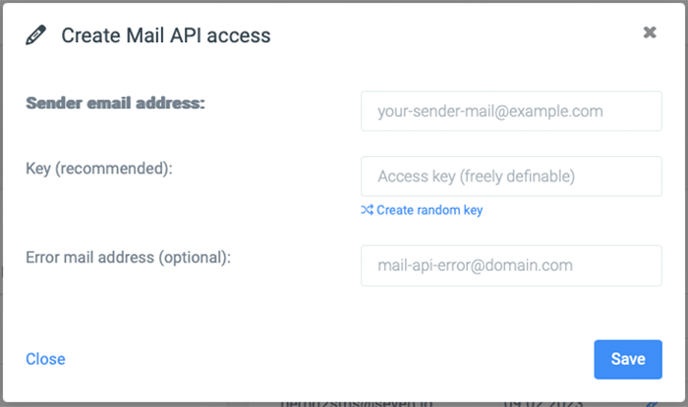
In the Create Mail API Address dialog you configure:
- Email Sender: the mail address from which you'll send. You can also wildcard a whole domain, e.g.
*@seven.io. - Key: a password used as the
key=parameter on every email-sent SMS. Letters, digits and- _ $only. Click Regenerate to get a fresh value. - Error Mail (optional): address that should receive delivery errors. Defaults to the sender address.
Click Save to add the address.
Additional Mail API settings
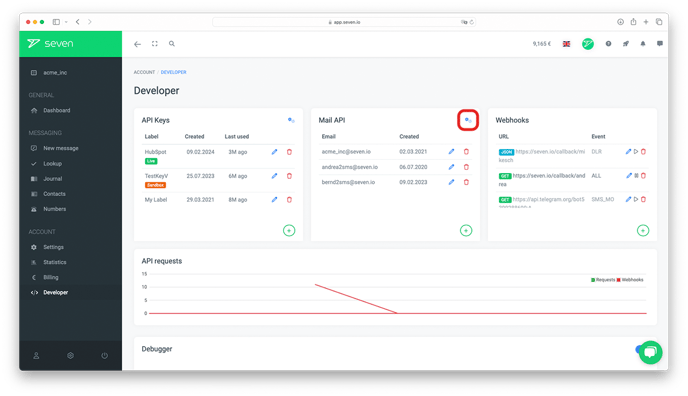
Open Developer -> Settings and expand the Mail API section to fine-tune behavior across all your Mail API addresses.
Maximum Character Count
Cap the body length so accidental signatures or footers don't blow up your SMS volume. 0 disables the limit. For tighter control, wrap your message in double hash marks (##This is your text##) - anything outside is dropped before sending.
Remove Signature
Strips quoted reply blocks (> like this) before sending.
Notification on Error
Toggle email or HTTP push notifications when an email-to-SMS attempt fails.
Insert Sender in SMS
Optionally prepends part of the email sender to every outgoing SMS:
- Full Address: e.g.
username@domain.com - Local Part (before @): e.g.
username - Don't attach: nothing is prepended
Default sender ID and RCS
If you want a specific sender name on every SMS, set a default sender ID (up to 11 alphanumeric characters). Replies are only possible if the sender ID is a phone number. RCS messages always use the sender name you registered with the agent.
Documentation
Full reference and examples in our Mail API documentation.